The Future ofStructural DesignStarts From the Ground.
ConGro AI — the world's first AI that automates structural design software. Live on CSI ETABS today; Revit, CSiBridge, Robot, and the rest of the toolchain rolling out. Days of modelling, compressed into minutes.
See ConGro AI in Action
LIVE · REVITWatch AI automate an entire structural design workflow.
— Watch ConGro AI automate an entire ETABS structural model —
Live, Side-By-Side With Your Model
OAPI · ETABSConGro AI is a separate desktop app that connects to your open ETABS session through the CSI OAPI. No file imports. No manual copy-paste.
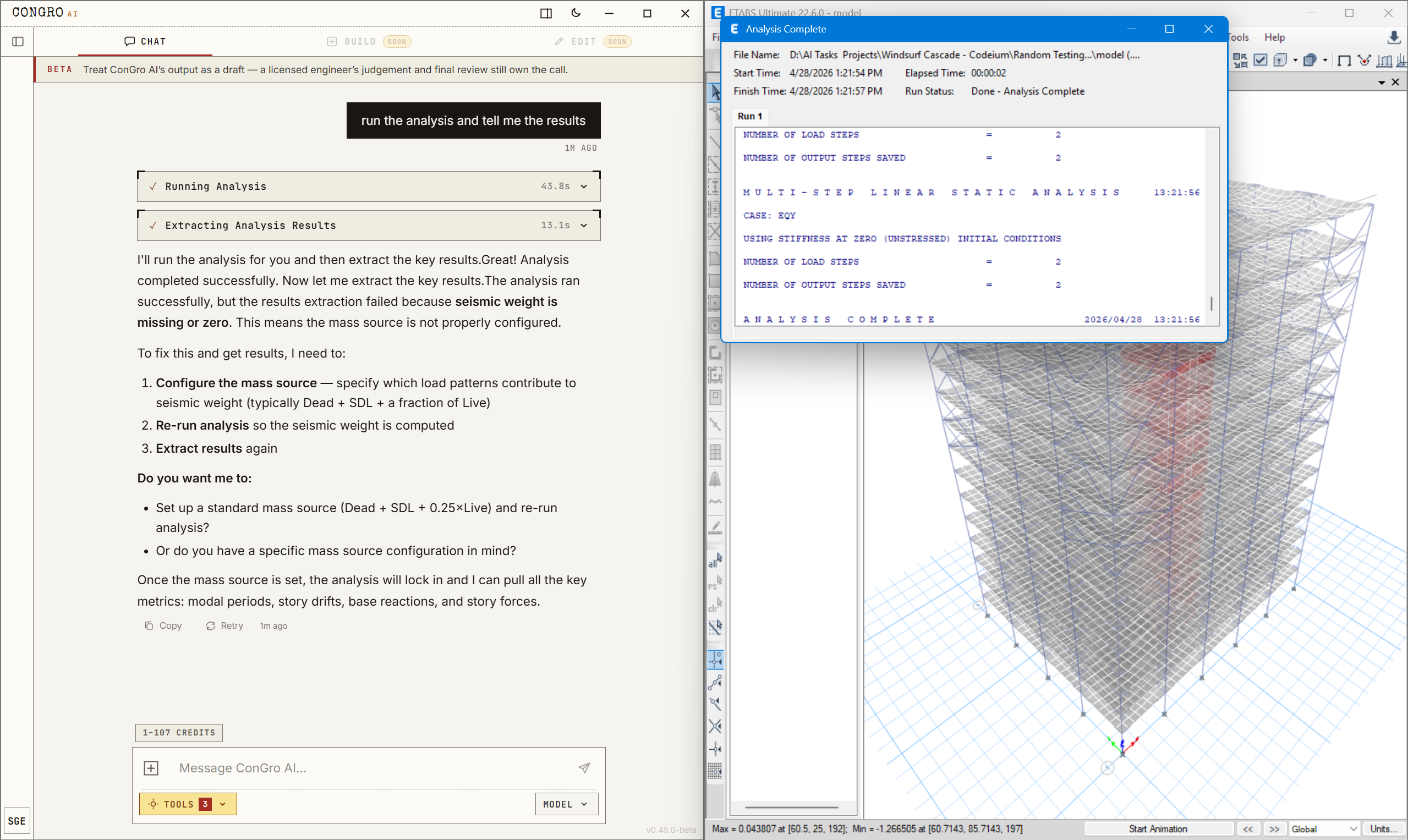
Type a request: "run the analysis and tell me the results."
ConGro AI sends the command to your already-open ETABS via the CSI OAPI — analysis runs, results stream back.
Hits a real engineering issue (mass source missing) — explains the fix in plain English.
Inside The App — ETABS
UI · 2 CLOSE-UPSBuilt for engineers — choose your tools, configure designs to ASCE 7-22 / AISC 360-22 / ACI 318-19 spec.
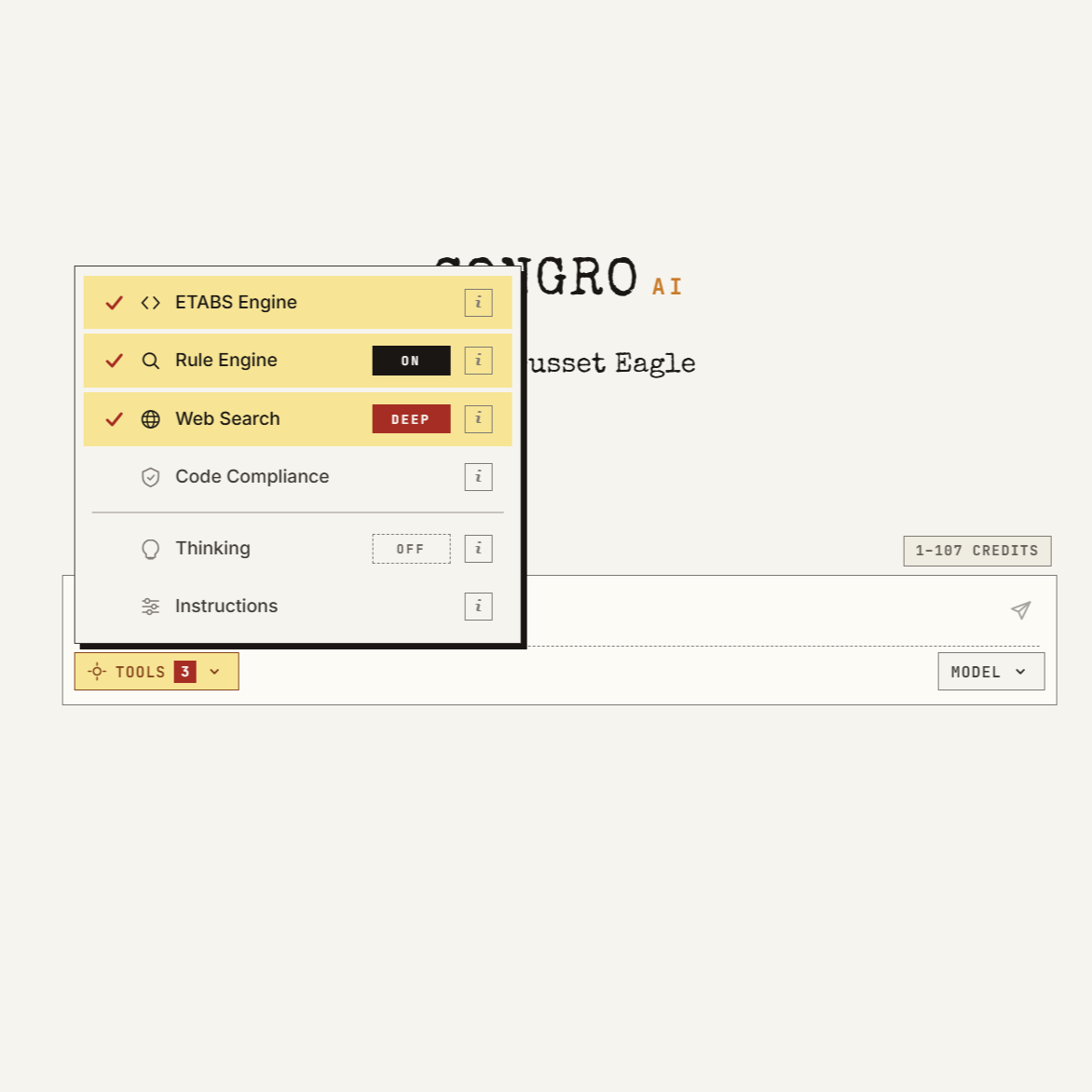
Toggle the right tools
ETABS Engine for direct model control. Rule Engine for code-checked research. Web Search, Code Compliance, custom Instructions. Each is its own credit line.
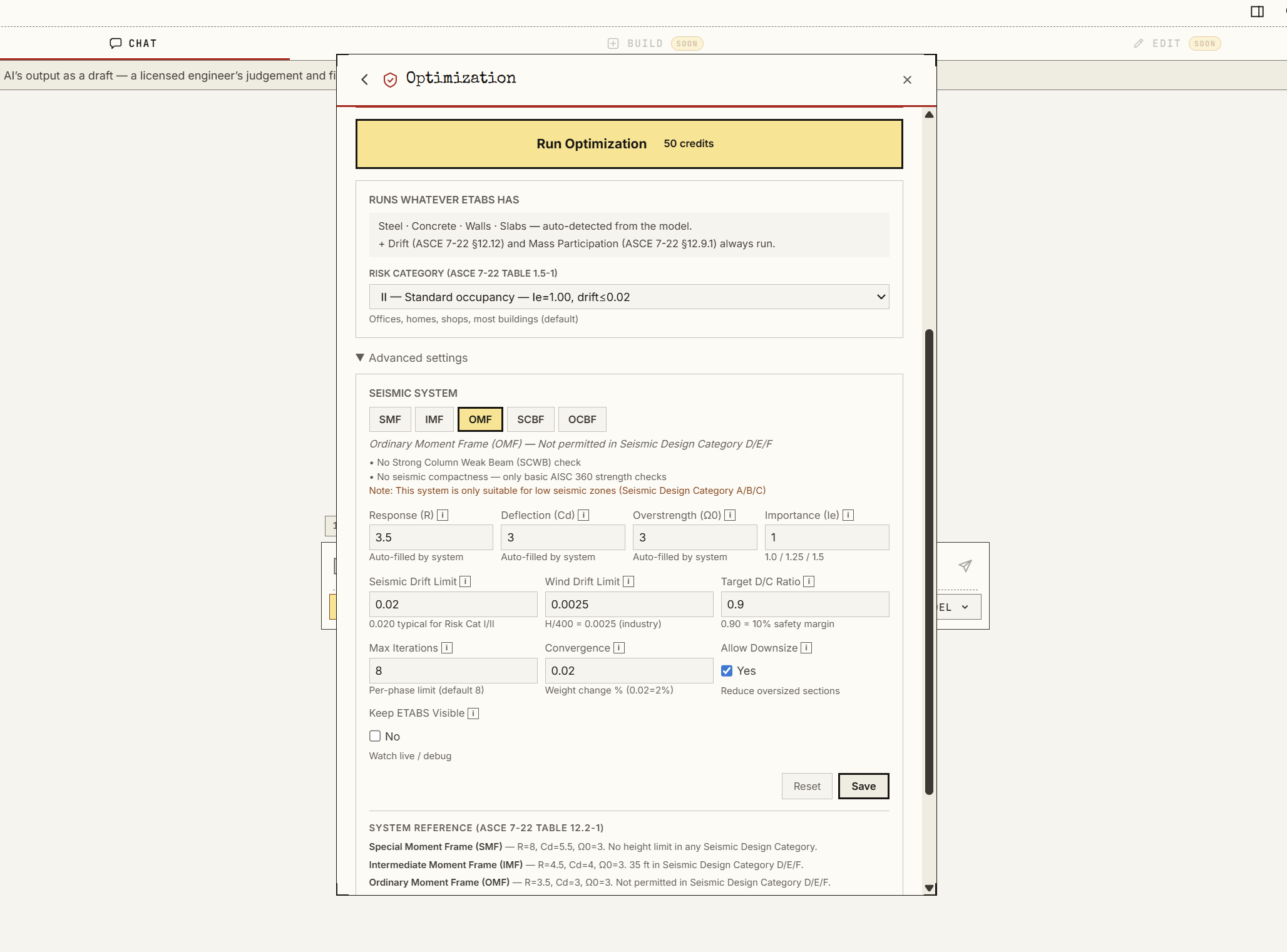
Full ASCE 7-22 / AISC depth
Configure optimization with risk category, R / Cd / Ω₀ / Iₑ, drift limits, target D/C ratio, iteration count, convergence. Real engineering parameters, not generic AI knobs.
Live, Inside Your Revit Model
REVIT APIConGro AI is a separate desktop app that connects to your open Autodesk Revit session through the Revit API. Every change runs inside a transaction that rolls back cleanly on failure.
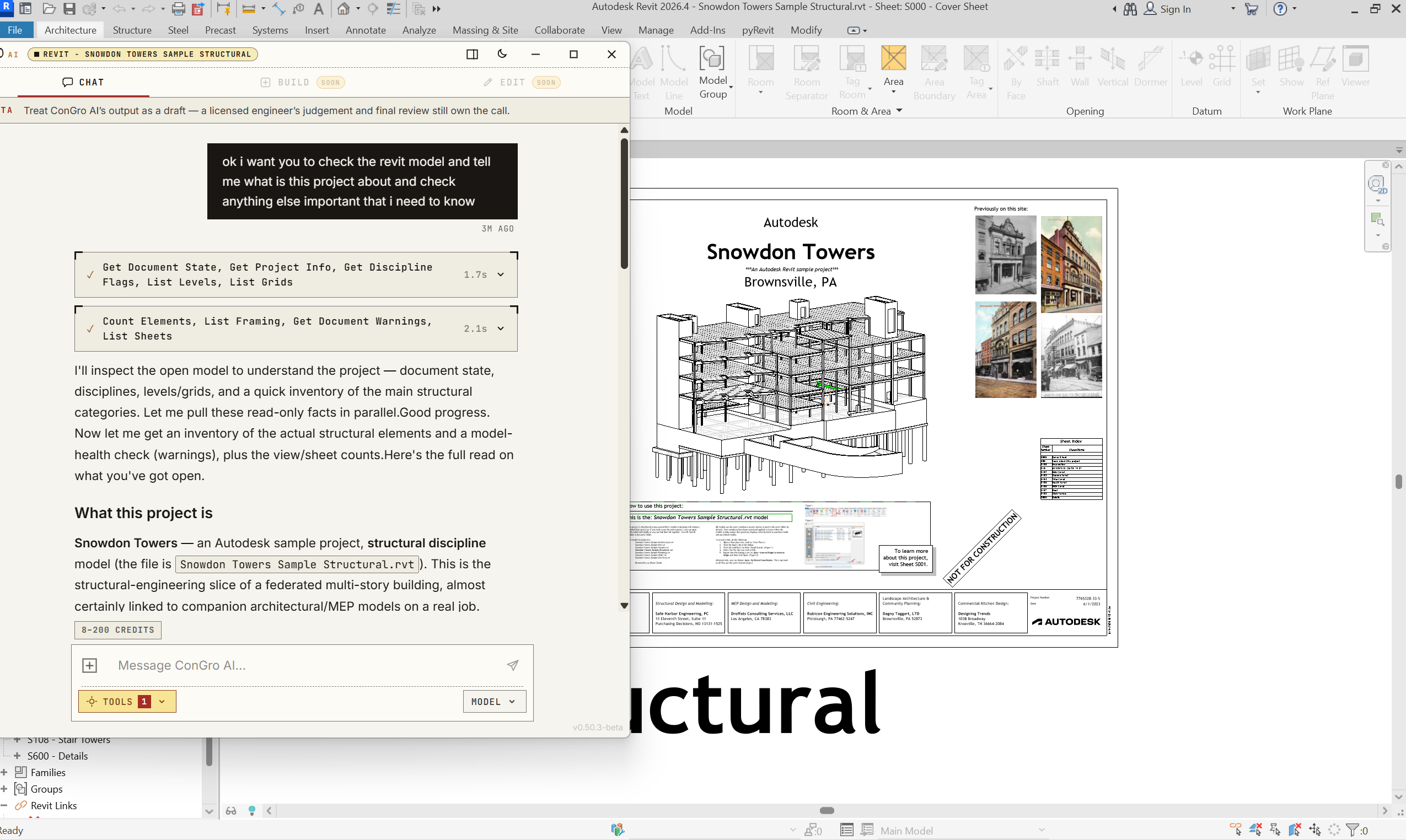
Type a request: "check my Revit model and tell me what this project is."
ConGro AI runs read-only checks through the Revit API — document state, levels, grids, framing, warnings, and sheets — without changing anything.
It reports back in plain English: discipline, structure, element counts, and anything that needs your attention.
Inside The App — Revit
REVIT · 3 WORKFLOWSReal work on a real Revit project — batch sheet management, cross-view selection, and view overrides, all driven from chat and run inside transactions.
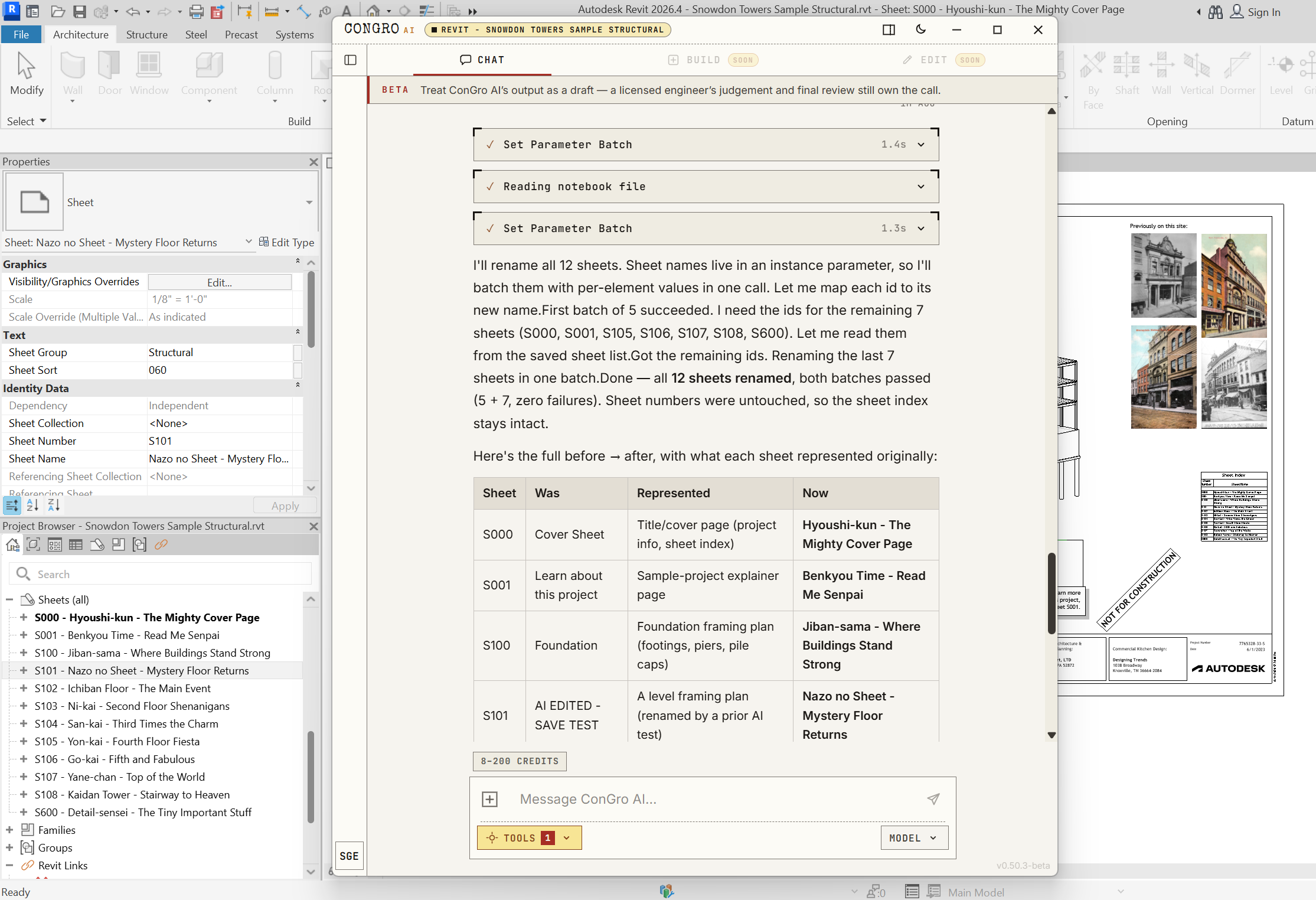
Batch-manage every sheet
Rename or re-stamp all sheets in one request. ConGro AI batches per-sheet values, keeps the sheet numbers and index intact, and reports exactly what changed.
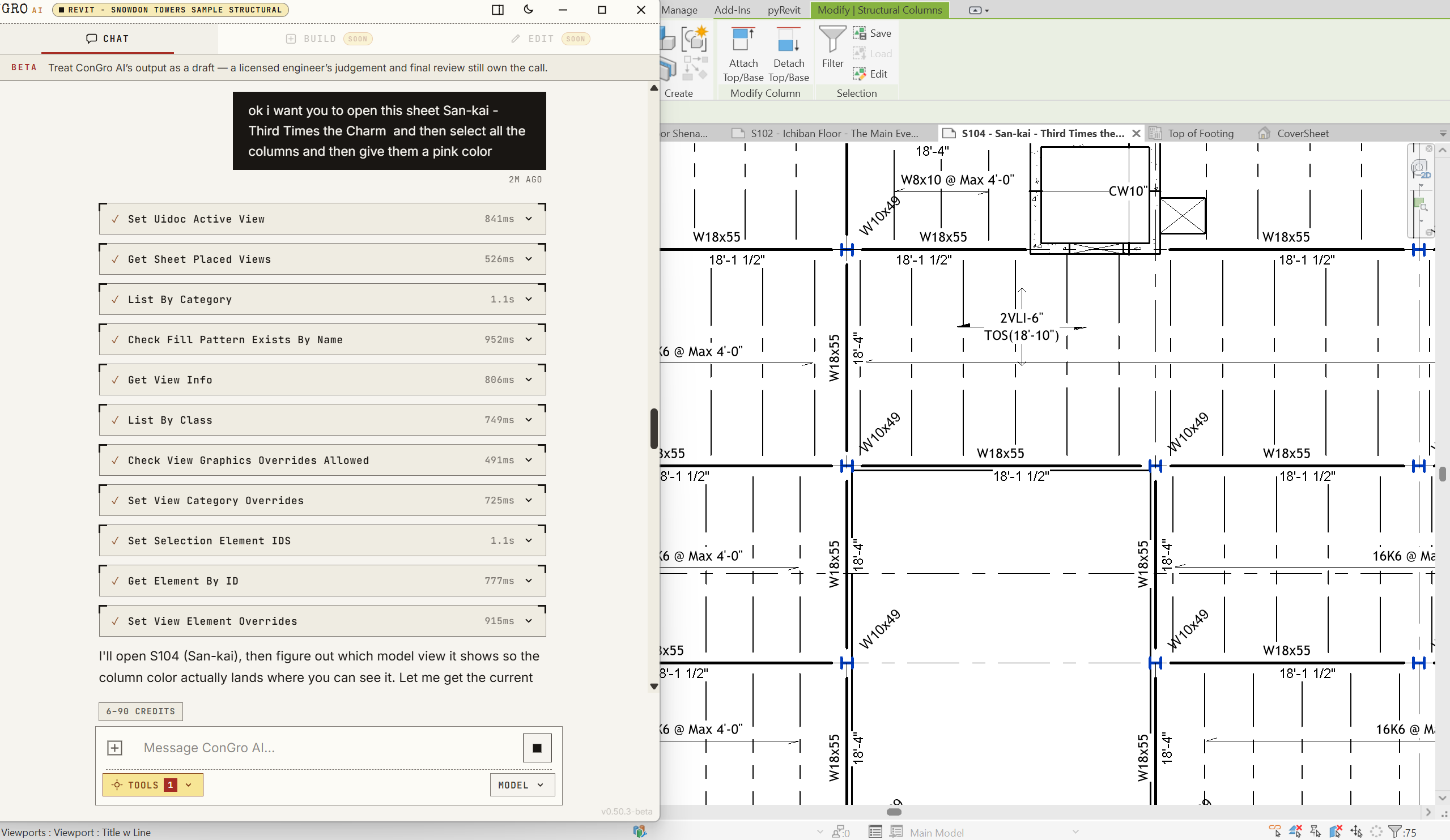
Find and select across views
Open a sheet, resolve its active view, and select every element of a category — like all columns — so a follow-up override or edit lands exactly where you mean it.
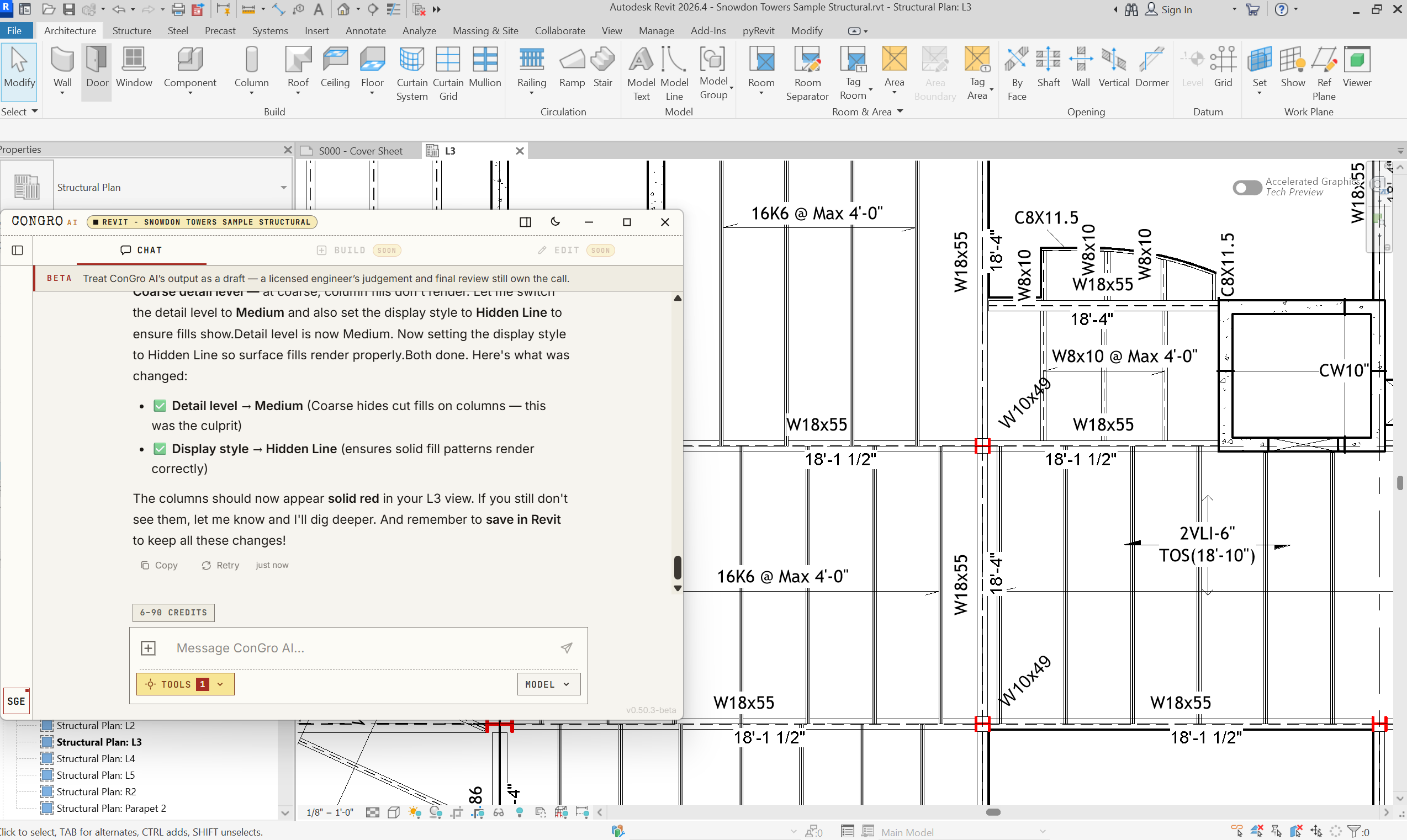
Detail level + color coding
Set view detail level and display style, then override element colors — e.g. columns rendered solid red — and ConGro AI explains why each setting was needed before reminding you to Save in Revit.
What ConGro AI Does
F-CARDS · 5AI-driven automation for the entire structural design workflow.
AI-Powered Design
Machine learning algorithms that understand structural engineering principles and automate design decisions.
Design Automation
Tasks that take hours or days manually are significantly accelerated. Model generation, load assignment, and structural setup — automated.
Multi-Software Support
One AI engine that speaks the language of every major structural design platform. Live on ETABS today; Revit next, with the rest of the industry rolling out after.
Code-Compliant Output
Generated designs follow building codes and standards. Every output is meant to be reviewed and verified by the engineer — ConGro AI assists, not replaces.
Iterative Optimization
AI iterates through design options to find optimal member sizes, reinforcement, and configurations.
Supported Software
2 LIVE · 10 TOTALCurrently live with ETABS — and expanding across the industry's leading platforms. Click any engine for the full integration spec and function list.










How It Works
PROCEDURE · 6 STEPSFrom a building description to a fully automated structural model in six steps.
Describe Your Building
01 / 06Tell ConGro AI what you want to build — building type, dimensions, number of stories, materials, location. The AI asks smart follow-up questions to fill in the gaps, just like a senior engineer would during a kickoff meeting.
Automated Code Research
02 / 06ConGro AI searches through structural engineering codes, standards, and design guides to pull the relevant provisions for your specific building — seismic category, wind exposure, material specs, load combinations, member sizing guidelines.
Design Report Generation
03 / 06A comprehensive structural design report is generated with every numerical value needed to build your model — grid coordinates, story heights, material properties, section sizes, load values, and design combinations. This becomes the single source of truth.
Automated Model Creation
04 / 06ConGro AI writes and executes scripts directly in your structural analysis software (ETABS), building the model phase by phase — geometry, properties, loads, analysis, and design checks. Each phase is verified before moving to the next.
Self-Correcting Pipeline
05 / 06If a script encounters an error, the AI reads the log, diagnoses the issue, rewrites the fix, and re-executes — automatically, without your intervention. The same way an engineer would debug their own work.
Real-Time Progress
06 / 06Watch the entire process unfold live — research findings, design decisions, script execution results, and design check outcomes all stream into your screen as they happen. Every artifact is saved and accessible.
Pricing
Simple, transparent pricing. Lock in Early Supporter rates forever.
Subscribe now and your price is locked in forever — even when rates increase later.
Foundation
No free trial — charged $25 today.
- All software integrations (ETABS + coming soon)
- Web search & rule engine
- Compliance & optimization
- Email support
Subscription auto-renews monthly. Cancel anytime from your dashboard. No refunds on partial periods. By subscribing, you agree to our Terms, Privacy Policy, and Refund Policy.
Charges appear on your statement as ODDLY EFFECTIVE.
Structure
No free trial — charged $100 today.
- All software integrations (ETABS + coming soon)
- Web search & rule engine
- Compliance & optimization
- Priority support
Subscription auto-renews monthly. Cancel anytime from your dashboard. No refunds on partial periods. By subscribing, you agree to our Terms, Privacy Policy, and Refund Policy.
Charges appear on your statement as ODDLY EFFECTIVE.
Need more credits this month?
One-time credit packs stack on your subscription. Pack credits roll over for 1 year from your most recent purchase and use up after your monthly subscription credits.
Credit Costs by Software
2 engines · more soonEvery message costs a base charge, and then every action the AI takes inside your model is charged on top. Revit messages and actions cost more than ETABS. Compare side by side below.
The base message is not the whole cost
A message that just answers a question costs the base. A message that touches your model costs the base plus every read and every change it makes — that per-action spend is where most of your credits go.
Measured on a live ETABS session: one message that read 2 things and made 2 changes cost 24 credits — 6 base + (2 × 3) + (2 × 6) — not 6. A full setup task across two messages came to 51 credits.
Optimization refunds:cancelled 22 · failed 22 · fatal abort full 45 · partial convergence none.
Example (ETABS):One message · 2 reads · 2 changes = 6 + (2 × 3) + (2 × 6) = 24 credits. The same message in Revit = 8 + (2 × 4) + (2 × 8) = 32.
Chat Mode vs Agent Mode
How you spendYou pick the mode in the composer. Both are metered the same way — base message plus every action — but an Agent run can take many actions from a single message, so it is the fastest way to spend credits.
Chat
One focused exchange. It does what you asked, then stops and waits for you. Predictable spend — you stay in the loop on every step.
Agent
Give it a whole task. It plans the steps and works through them inside a single message — billed as one message, metered per action.
Agent cap:An Agent run stops at 60 actions — about 360 credits on ETABS or 480 on Revit. It then asks whether to keep going; saying continue grants another budget. It never runs past the cap without asking you first.
Have questions about pricing? Connect with me directly.
Connect on LinkedInFrequently Asked
Q · 6Quick answers about plans, credits, and packs.